Thursday, April 2, 2015

Fun with Parallax


Do you like fancy parallax effect?
Do you want to add it with ease to any view?

So do I. My first steps were to extend View and draw everything myself. Later I've tried to extend ImageView and play with its Matrix. But I always wanted an easier solution. Without changing each view that supposed to have one. And here what I came up with.


There is only one solution to support any view/hierarchy without changing it - we need custom layout that will add parallax effect to its content. Idea is following:


FrameLayout will emulate more space for its content. So for example if FrameLayout width is 100px it will position its content as if it had 150px. This extra space is required for parallax animation. This is how it can be done:
  @Override
  protected void onMeasure(int widthMeasureSpec, int heightMeasureSpec) {
    super.onMeasure(
        updateMeasureSpec(widthMeasureSpec),
        updateMeasureSpec(heightMeasureSpec)
    );

    int width = (int) (getMeasuredWidth() / (1 + 2 * mStrength));
    int height = (int) (getMeasuredHeight() / (1 + 2 * mStrength));

    setMeasuredDimension(width, height);
  }

  @Override
  protected void onLayout(boolean changed, int left, int top, int right, int bottom) {
    mOffsetX = (int) ((right - left) * mStrength);
    mOffsetY = (int) ((bottom - top) * mStrength);

    super.onLayout(changed, left - mOffsetX, top - mOffsetY, right + mOffsetX, bottom + mOffsetY);

    for (int index = getChildCount() - 1; index >= 0; --index) {
      View view = getChildAt(index);
      view.offsetLeftAndRight(-mOffsetX);
      view.offsetTopAndBottom(-mOffsetY);
    }
  }

  /*
   * if we have EXACTLY - emulate more space for measuring
   * if we have anything else - measure content and than decrease our size based on it
   */
  private int updateMeasureSpec(int measureSpec) {
    int mode = MeasureSpec.getMode(measureSpec);
    if (mode != MeasureSpec.EXACTLY) {
      return measureSpec;
    }
    int size = MeasureSpec.getSize(measureSpec);
    int offset = (int) (size * mStrength);
    return MeasureSpec.makeMeasureSpec(size + offset * 2, mode);
  }
Now we need to offset content. We can do this in scroll callback from ViewTreeObserver but I prefer to use pre-draw callbacks. This way offsets will be updated even during transition animations.
  @Override
  protected void onAttachedToWindow() {
    super.onAttachedToWindow();

    getViewTreeObserver().addOnPreDrawListener(this);
  }

  @Override
  protected void onDetachedFromWindow() {
    super.onDetachedFromWindow();

    getViewTreeObserver().removeOnPreDrawListener(this);
  }

  @Override
  public boolean onPreDraw() {
    getLocationInWindow(mLocationCache);

    View root = getRootView();
    int width = getWidth();
    int height = getHeight();
    int rootWidth = root.getWidth();
    int rootHeight = root.getHeight();

    // parallax effect [0..1]
    float parallaxX = width < rootWidth ? mLocationCache[0] / (float) (rootWidth - width) : .5f;
    float parallaxY = height < rootHeight ? mLocationCache[1] / (float) (rootHeight - height) : .5f;

    // parallax offset [-value..+value]
    float offsetX = (parallaxX * 2 - 1f) * mOffsetX;
    float offsetY = (parallaxY * 2 - 1f) * mOffsetY;

    for (int index = getChildCount() - 1; index >= 0; --index) {
      View view = getChildAt(index);
      view.setTranslationX(-offsetX);
      view.setTranslationY(-offsetY);
    }

    return true;
  }
Thats it! Now all content inside our layout will have parallax effect.

Sources: https://github.com/MatrixDev/FunWithParallax

Monday, March 30, 2015

Fun with SQLite and ORMLite

Need to store complex objects in SQLite with ease?
Need document-based database like MongoDB?

It's actually very easy to do. This approach is intended to be used in Android but also works well outside. Just to be clear - this article describes how to store complex objects with tons of sub-objects, arrays and other stuff in DB without need of multiple tables and foreign keys. This is ideal approach for beginners and applications with lightly-loaded DBs.

Disclaimer: don't use it if you have simple objects, heavy-loaded DBs or if you need relations between tables. In these cases it will gain nothing but negative impact on performance.

So if you're still here lets take for example following class:
class ComplexData {
  public String id;
  public long timestamp;

  // some complex data here
}
Depending on how complex data is, it might require few tables with foreign keys. But we can go another way. Create a table with id, timestamp and text columns and write serialized object into text column. Id and timestamp columns are taken just as an example in case we need to search objects by both values.

We'll need DAO and DBO in case we're using ORMLite. DBO will look something like this:
@DatabaseTable(tableName = "complex_data")
class ComplexDataDbo {
  private ComplexData mObject;

  @DatabaseField(id = true, useGetSet = true)
  private String id;

  @DatabaseField(useGetSet = true)
  private long timestamp;

  @DatabaseField(useGetSet = true)
  private String json;

  private ComplexDataDbo() {
  }

  public ComplexDataDbo(ComplexData data) {
    mObject = data;
  }

  public ComplexData getComplexData() {
    return mObject;
  }

  public String getId() {
    return mObject != null ? mObject.id : "";
  }

  public void setId(String id) {
  }

  public long getTimestamp() {
    return mObject != null ? mObject.timestamp : 0;
  }

  public void setTimestamp(long timestamp) {
  }

  public String getJson() {
    return PackUtils.pack(mObject); // I'm using Jackson for serialization
  }

  public void setJson(String json) {
    mObject = PackUtils.unpack(ComplexData.class, json);
  }
}
Now we need to create DAO. It is very simple with help of ORMLite:
private Dao<ComplexDataDbo, String> mComplexDataDao;

// ...

ConnectionSource connection = new AndroidConnectionSource(...);

mComplexDataDao = DaoManager.createDao(connection, ComplexDataDbo.class);
TableUtils.createTableIfNotExists(connection, ComplexDataDbo.class);
Now we can add objects to DB like this:
mComplexDataDao.createOrUpdate(new ComplexDataDbo(complexData));
And fetch them:
ComplexData complexData = mComplexDataDao.queryForId(id).getComplexData();
For more advanced search we can use:
List<ComplexDataDbo> dbos = mComplexDataDao.queryBuilder()
    .offset(offset).limit(limit)
    .where().lt("timestamp", timestamp)
    .query();
Thats it! I've already used this approach with success in two project so be sure - it is tested and performs well.

Thursday, March 26, 2015

Fun with Parcelables

Imagine that you have a task to create wizard-like application on Android which consists of three pages and user must fill some information about himself on each page.

Basic implementation will contain Model and three Activities.

Model will look like this:
public class Model implements Serializable { // or Parcelable, it doesn't matter
  // Page #1 info
  public String nameFirst;
  public String nameLast;

  // Page #2 info
  public long birthday;

  // Page #3 info
  public String address;
}

And each activity will contain these lines:
public class Activity{N} extends Activity {
  
  private Model mModel;
  
  @Override
  public void onCreate(Bundle savedInstanceState) {
    mModel = (Model) getIntent().getSerializableExtra("model");
    // ...
  }

  private void goToNextScreen() {
    startActivity(new Intent(this, Activity{N+1}.class).putExtra("model", mModel));
  }

  // ...  
}

So far so good.

So whats wrong here?

Now imagine that user has filled form on screen #3 and went back to change something on screen #1. Everything seems OK until user goes forward again. All entered information on following screens will disappear. This is happening because Model is actually copied between activities and we're not updating previous Models with new information.


It can be solved, for example, by using startActivityForResult and passing newer Model as Activity's result in onBackKeyPressed method. This approche is good if we have simple data and few screens but in big projects it becames a nightmare to manage it.

We need some automated solution that is easy to use.

Lets play with Parcelables

A lot of people out there hate Parcelable. And they are not wrong - you have to write tons of code for each class for serialization and it is very easy, for example, to miss that one variable.

But Parcelable has one property that I always liked - Creator. With its help we can control not only object serialization but allocation as well.

Idea is following - after creating Model, we put it into a weak cache. During deserialization we will just take Model from that cache. If no Model is found there - just proceed with typical deserialiation. This way all Activities will share the same Model instance and if Activity was killed by Android - we just deserialize it.


For this we will need cache with weak references and base Parcelable class. For actual serialization I will use Jackson library but it can be anything (for example Serializable). For me Jackson library is a preferred way just because it is highly configurable.

Here is our base Parcelable class:
public class JsonParcelable implements Parcelable {

  private static final WeakCache<JsonParcelable> sCache = new WeakCache<>();

  @JsonIgnore
  private String mId;

  protected JsonParcelable() {
    mId = UUID.randomUUID().toString();
    sCache.put(getClass().getName() + "%" + mId, this);
  }

  @Override
  public int describeContents() {
    return 0;
  }

  @Override
  public void writeToParcel(Parcel parcel, int flags) {
    parcel.writeString(mId);
    parcel.writeString(getClass().getName());
    parcel.writeString(PackUtils.pack(this)); // serialize to JSON here
  }

  public static final Creator<JsonParcelable> CREATOR = new Creator<JsonParcelable>() {
    @Override
    public JsonParcelable createFromParcel(Parcel parcel) {
      try {
        String id = parcel.readString();
        String className = parcel.readString();
        String json = parcel.readString();

        synchronized (sCache) {
          JsonParcelable object = sCache.get(className + "%" + id);
          if (object != null) {
            return object;
          }
          return (JsonParcelable) PackUtils.unpack(Class.forName(className), json); // deserialize from JSON here

        }
      } catch (Exception ex) {
        throw new RuntimeException(ex);
      }
    }

    @Override
    public JsonParcelable[] newArray(int size) {
      return new JsonParcelable[size];
    }
  };
}
And weak cache class:
public class WeakCache<T> {

  private Map<String, Ref<T>> mObjects = new HashMap<>();
  private ReferenceQueue<T> mQueue = new ReferenceQueue<>();

  public T get(String id) {
    Ref ref;
    while ((ref = (Ref) mQueue.poll()) != null) {
      mObjects.remove(ref.id);
    }

    T object = null;

    Ref<T> refT = mObjects.get(id);
    if (refT == null || (object = refT.get()) == null) {
      mObjects.remove(id);
    }
    return object;
  }

  public T put(String id, T object) {
    mObjects.put(id, new Ref<>(id, object, mQueue));
    return object;
  }

  static class Ref<T> extends WeakReference<T> {
    public final String id;

    Ref(String id, T r, ReferenceQueue<? super T> q) {
      super(r, q);
      this.id = id;
    }
  }
}

How to use it?

It is very easy to use it. All you need to do is just to extend JsonParcelable and pass that object as Parcelable through Intent. Everything else is done automatically.

So our model will look like this:
public class Model extends JsonParcelable {
  // ...
}

To start Activity just use:
startActivity(new Intent(...).putExtra(mModel));

And to get Model inside Activity:
mModel = getIntent().getParcelableExtra("model");

Thats it!!!

Thursday, December 25, 2014

Android's alternative IPC approche

I hate Android's Services

To be more precise - I hate asynchronous nature of bindService method. Sometimes it is much more convenient to have synchronous way to get AIDL object.

Did you know that almost each Android's *Manager has its own *ManagerService object?
For example ActivityManager and ActivityManagerService or WindowManager and WindowManagerService, etc.

I was always curious about them. You can get each Manager through Context.getSystemService method and it works synchronously. It would be a waste of time and memory to bind all of them at application startup so they must be bound during getSystemService call. After some digging I found out that they are and it's done through hidden "global context object" which is Binder.


How is Binder connected to AIDL?

Generated AIDL Stub extends Binder and overrides onTransact method, while AIDL Proxy wraps Binder and calls its transact method. Actually Binder is just a "gateway" that passes bytes in one direction, so all function calls are serialized into a byte array, passed through a Binder and than deserialized.

So the problem is only to pass Binder and Parcel can do it. If Parcel can - Bundle can do it either. And here it struck me - Binder can be passed through Intents and ContentProviders.


Fun with Intents

You can also have some fun with Intents. I don't know why someone would start Activity and pass AIDL through Intent but it is possible to pass AIDL object to IntentService and track that task's progress.

But Intents are of no interest to me now.


Fun with ContentProviders (CP)

For a long time I hated CPs and their DB-related interface until I found interesting function - ContentProvider.exec. It has simple interface and can receive/return Bundles. And with bundles you can pass complex objects, for example AIDL objects. And it turns out that CPs are synchronous.

Eureka!!! Here is a way to synchronously "bind" to another process. You can just create AIDL stub and return it through CP.

For example this is my AIDL interface:
interface ICentral {
    int getRequestsCount();
    void sendRandomRequest(long userTime, String inputArg, ICallback callback);
}

And my ContentProvider:
public class CentralProvider extends ContentProvider {

    // ...

    @Override
    public Bundle call(String method, String arg, Bundle extras) {
        if (extras != null) {
            extras.setClassLoader(ParcelableBinder.class.getClassLoader());
        }
        switch (Central.Method.valueOf(method)) {
            case GetServiceBinder:
                Bundle bundle = new Bundle();
                bundle.putParcelable("binder", new ParcelableBinder((IBinder) CentralBinder.self));
                return bundle;
        }
        return super.call(method, arg, extras);
    }
}

Now to "client" side. To simplify things I need a wrapper:
public class Central {

    public static final Uri AUTHORITY = Uri.parse("content://dev.matrix.central/");

    private static ICentral sCentral;

    public static ICentral getProxy() {
        if (sCentral == null || !sCentral.asBinder().pingBinder()) {
            Bundle bundle = BaseApp.self().getContentResolver().call(AUTHORITY, Method.GetServiceBinder.name(), null, null);
            bundle.setClassLoader(ParcelableBinder.class.getClassLoader());
            sCentral = ICentral.Stub.asInterface(ParcelableBinder.getBinder(bundle, "binder"));
        }
        return sCentral;
    }
}

And here is how to use it:
int count = 0;
try {
    count = Central.getProxy().getRequestsCount();
} catch (Exception ex) {
    // ...
}

Good:
  • full AIDL support
  • fully synchronous "binding" to remote process
  • seamless handing and reconnected of dead Binders

Bad:
  • you don't have service "connection" so remote process can be killed at any time unless at least one service is running

Performance (tested on Nexus 5 with Android 5.0):
  • AIDL method invokes - 0.2-0.5 ms
  • Binder pinging to check if it is alive - 0.1-0.3 ms
  • hot "bind" (if remote app is running) - 1-2 ms
  • cold "bind" (if remote app is down) - 50-100 ms

Wednesday, December 17, 2014

My "second" first presentation at GlobalLogic's Mobile TechTalk

Not so long ago I had my "second" first presentation at GlobalLogic's Mobile TechTalk.

Why "second" you ask? Because I was supposed to talk during first TechTalk but, unfortunately, I had to go abroad. I like to play with OpenGL from time to time so my topic was about OpenGL, to be more specific about direct access to OpenGL texture's buffer in Android. I have to thank my co-worker Alex for presenting it, so my work was not forgotten :)

Here is post about GlobalLogic's Moble TechTalk #1:
http://globallogic.com.ua/uk/press-releases/mobile-techtalk-lviv/

And now about my real first presentation. I'm a big fan of Android, its UI framework and have spent countless hours investigating how does it work, looking through the sources and so on. I have a lot to talk about but for this presentation I've choosen "overdraw" problem. I had problems with that nasty beast before so, maybe, just maybe, it was interesting to someone. Final presentation was prepared with Alex's help.

And here are links for this presentation on GlobalLogic's Mobile TechTalk #2:
http://globallogic.com.ua/uk/press-releases/welcome-to-lviv-mobile-techtalk-2/
http://globallogic.com.ua/uk/press-releases/lviv-mobile-2014-coverage/

And now my thoughts on all of that - it was awesome!!! Hope others think so as well =)

Sunday, October 26, 2014

Invoking callbacks for multiple subscribers

How often do you need to invoke callbacks for a multiple subscribers? For example when you have few observer-like classes.

Consider foolowing code:

public void foo() {
  // do something
  for (Callback callback : mCallbacks) {
    callback.bar();
  }
  // do something
}

Personally, I hate to write code like this - too many lines of code that is mostly duplicate from other places. Even worst when you need to ensure UI thread execution and few more lines go to Handler...

So what is the solution? Most universal (and probably most elegant as well) solution that I've came up with is to use Reflections or to use Proxy to be more specific. Most people I ask didn't even know about existance of this class. In short it allows us to create a class in runtime which implements any number of interfaces. Yes, this adds some overhead but, frankly, this is quite small overhead if used somewhat sparingly and almost non-existantant when we add Handler.

So here is my callbacks invoker implementation:

public class Invoker<T> {

  public final T object;
  public final List callbacks = new ArrayList<>();

  private Invoker(T object) {
    this.object = object;
  }

  @SuppressWarnings("unchecked")
  public static <T> Invoker create(Class cls) {
    DirectInvocation<T> handler = new DirectInvocation<T>();
    Object object = Proxy.newProxyInstance(
        cls.getClassLoader(), new Class[] { cls }, handler
    );
    return handler.invoker = new Invoker<T>((T) object);
  }

  static class DirectInvocation<T> implements InvocationHandler {
    public Invoker<T> invoker;

    @Override
    public Object invoke(Object proxy, Method method, Object[] args) throws Throwable {
      for (Object object : invoker.callbacks.toArray()) {
        method.invoke(object, args);
      }
      return null;
    }
  }
}

And now some example how to use it:

...
Invoker<Callback> mInvoker = Invoker.create(Callback.class);
...
mInvoker.callbacks.add(...);
...

public void foo() {
  // do something
  mInvoker.object.bar(); // invokes all callbacks
  // do something
}

Now it looks much cleaner, In addition we can easily add Handlers, Threads or anything else to invoke out callbacks inside invoker itelf.

Saturday, October 18, 2014

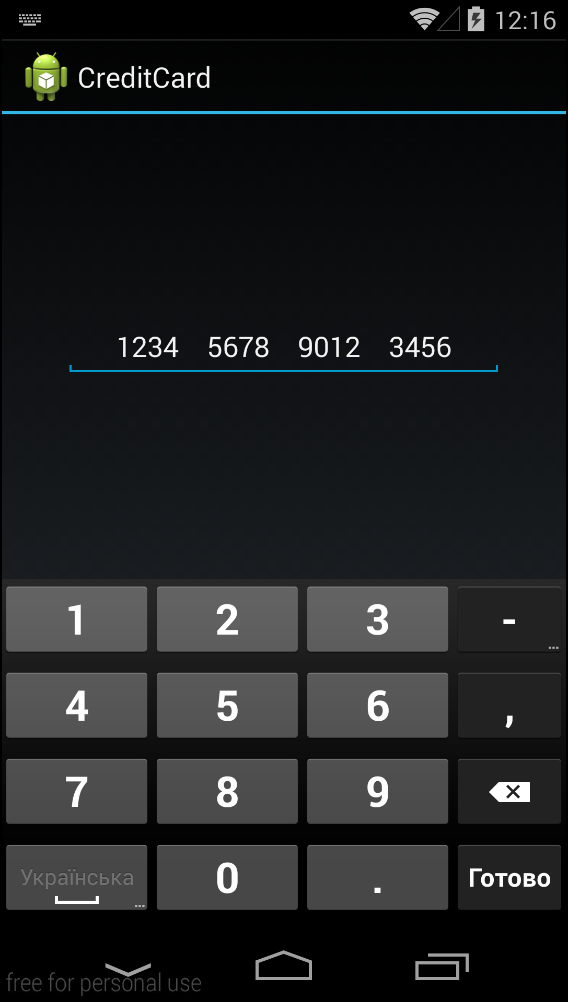
EditText for CreditCards

Internet has tons of different implementations to add credit card support in Edit.
Most of them listen for text changes and add spaces and I don't like this approche. Mostly because user can see those space while selecting text.

So I will add mine implementation :)

Here is screenshot from Gennymotion:

And sources as well (link on GitHub):

public class CreditCardTransformation implements TransformationMethod {

  private static final Divider sDivider = new Divider();

  @Override
  public CharSequence getTransformation(final CharSequence source, View view) {
    return new SpannedWrapper(source) {
      @Override
      @SuppressWarnings("unchecked")
      public  T[] getSpans(int start, int end, Class type) {
        T[] array = super.getSpans(start, end, type);
        if (!type.isAssignableFrom(Divider.class)) {
          return array;
        }
        Object[] result = (Object[]) Array.newInstance(type, array.length + 1);
        result[0] = sDivider;
        System.arraycopy(array, 0, result, 1, array.length);
        return (T[]) result;
      }

      @Override
      public int getSpanStart(Object tag) {
        if (tag instanceof Divider) {
          return 0;
        }
        return super.getSpanStart(tag);
      }

      @Override
      public int getSpanEnd(Object tag) {
        if (tag instanceof Divider) {
          return length();
        }
        return super.getSpanEnd(tag);
      }
    };
  }

  @Override
  public void onFocusChanged(View view, CharSequence sourceText, boolean focused, int direction, Rect previouslyFocusedRect) {
  }

  static class SpannedWrapper implements Spanned {
    private Spanned mSpanned;
    private CharSequence mSource;

    SpannedWrapper(CharSequence source) {
      mSource = source;
      if (mSource instanceof Spanned) {
        mSpanned = (Spanned) source;
      }
    }

    @Override
    @SuppressWarnings("unchecked")
    public  T[] getSpans(int start, int end, Class type) {
      if (mSpanned != null) {
        return mSpanned.getSpans(start, end, type);
      }
      return (T[]) Array.newInstance(type, 0);
    }

    @Override
    public int getSpanStart(Object tag) {
      if (mSpanned != null) {
        return mSpanned.getSpanStart(tag);
      }
      return 0;
    }

    @Override
    public int getSpanEnd(Object tag) {
      if (mSpanned != null) {
        return mSpanned.getSpanEnd(tag);
      }
      return 0;
    }

    @Override
    public int getSpanFlags(Object tag) {
      if (mSpanned != null) {
        return mSpanned.getSpanFlags(tag);
      }
      return 0;
    }

    @Override
    public int nextSpanTransition(int start, int limit, Class type) {
      if (mSpanned != null) {
        return mSpanned.nextSpanTransition(start, limit, type);
      }
      return 0;
    }

    @Override
    public int length() {
      return mSource.length();
    }

    @Override
    public char charAt(int index) {
      return mSource.charAt(index);
    }

    @Override
    public CharSequence subSequence(int start, int end) {
      return mSource.subSequence(start, end);
    }

    @Override
    public String toString() {
      return mSource.toString();
    }
  }

  static class Divider extends ReplacementSpan {
    @Override
    public int getSize(Paint paint, CharSequence text, int start, int end, Paint.FontMetricsInt fm) {
      int groups = Math.min(3, (end - start) / 4);
      return (int) (paint.measureText(text, start, end) + paint.getTextSize() * groups);
    }

    @Override
    public void draw(Canvas canvas, CharSequence text, int start, int end, float x, int top, int y, int bottom, Paint paint) {
      int offset = 0;
      int groupStart = start;
      while (groupStart < end) {
        int groupEnd = Math.min(groupStart + 4, end);
        canvas.drawText(text, groupStart, groupEnd, x + offset, y, paint);
        offset += paint.measureText(text, groupStart, groupEnd) + paint.getTextSize();
        groupStart = groupEnd;
      }
    }
  }
}